Image Color Depth
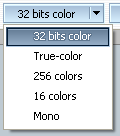
The
program supports the following color formats:
- true-color with alpha-channel (32-bit)
- true-color (24-bit)
- 256-color (8-bit)
- 16-color (4-bit)
- monochrome (1 bit)
Changing the format of the color, icon colors are automaticly converted
accordingly. When converting to 16-color format, you can select a level of dithering.

Since icons generally are such a
small size, the quality of the 256-color image is very similar to a
true-color image so, if you select 256 color format and draw an icon,
you have a limited range of colors.
AWicons provides a high-quality color
reduction algorithm, so that you can create a 256-color icon from your original
true-color images.
Image Size
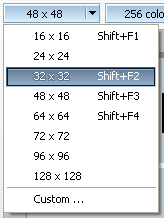 AWicons
can now edit images up to
128x
128 in the standard version
and up to
256x
256 in the
Pro version.
You simply select the appropriate item in the drop down menu to quickly
set the standard size of the image. You should select the
Custom...
item and set the necessary values of width and height, using the sliders,
if a non-standard size is necessary.
 Introduction
 Working with library
 Stock Icons
 Vista Artistic Icons